




Rating Breakdown & Score Rationale
Surfshark VPN earns an outstanding 4.6 out of 5.0 overall score in our 2026 assessment. Below is the rationale behind each category score, drawn from published audits, provider documentation, and independent testing:
- Device Compatibility (4.95 / 5.0): Supports unlimited simultaneous device connections on a single account with native apps for Windows, macOS, Linux, iOS, Android, Fire TV, Apple TV, and browser extensions.
- Streaming & Unblocking (4.80 / 5.0): Independent testing reports reliable access to major regional catalogs including Netflix (US, UK, Japan, Canada, Australia), BBC iPlayer, Disney+, Max, and Hulu, with a Smart DNS option for consoles and TVs.
- User Experience & Apps (4.75 / 5.0): Clean, standardized user interface across all platforms with 1-click Quick Connect, intuitive settings, and advanced tools like Nexus IP Rotator and Bypasser.
- Server Locations & Network (4.70 / 5.0): Operates a fleet of over 4,500 diskless RAM-only servers across 100 countries, delivering broad global location spoofing and high server density.
- Speed & Performance (4.65 / 5.0): Powered by WireGuard protocol, retaining an average of 95% download throughput on nearby servers in independent testing.
- Torrenting & P2P (4.65 / 5.0): Full P2P support across 100% of its server fleet with zero bandwidth limits, automated kill switch protection, and CleanWeb ad/malware filtering.
- Privacy & Legal Jurisdiction (4.60 / 5.0): Registered in the Netherlands with a Deloitte-audited zero-logs policy, quarterly transparency reports, and 100% RAM-only server hardware.
- Security & Advanced Protection (4.60 / 5.0): Includes AES-256 / ChaCha20 encryption, Dynamic MultiHop, Nexus software-defined networking, post-quantum cryptography, and the optional Surfshark One security suite.
Specifications & Features
Executive Summary: Why Surfshark Stands Out
Surfshark rose from newcomer to top-tier contender by doing two things unusually well: removing limits and bundling value. Its headline feature is unlimited simultaneous connections, one subscription protects every device you and your household own, with no counting. That alone makes it one of the best-value VPNs available, especially on a long-term plan.
But Surfshark is more than a VPN. Through Surfshark One, it aims to be a one-app privacy platform, adding antivirus, breach monitoring, a private search tool, and identity protection alongside the VPN. For users who’d rather not juggle separate subscriptions, that consolidation is a genuine draw.
On the technology side, Surfshark punches above its price. It runs a RAM-only network, offers MultiHop (double-VPN) and its Nexus network technology (which enables features like IP rotation), supports post-quantum encryption, and in 2025 introduced Dausos, a new proprietary protocol, though that’s currently macOS-only. It’s also merged with Nord Security (since 2022), while continuing to operate independently, and backs its no-logs claims with regular independent audits and quarterly transparency reports.
The main trade-offs are a high month-to-month price (long-term plans are far cheaper) and the fact that some newer features, like Dausos, aren’t yet everywhere. But for households, streamers, and anyone who wants a lot of protection for a little money, Surfshark is an easy recommendation.
Key Takeaway: Surfshark pairs unlimited device connections and strong streaming with a full one-app security suite (Surfshark One) and advanced tech like RAM-only servers, Nexus, and post-quantum encryption, making it one of the best-value all-rounders in 2026.
Who Is Surfshark For?
Surfshark suits a wide range of users, and excels for a few in particular:
- Households and multi-device users: Unlimited connections mean one plan covers every phone, laptop, tablet, TV, and console in the home.
- Streamers: Fast speeds and reliable unblocking across major Netflix regions and other platforms make it a strong entertainment pick.
- Value seekers who want an all-in-one suite: Surfshark One bundles antivirus, breach alerts, and identity tools, potentially replacing several separate subscriptions.
- Privacy-minded users: RAM-only servers, independent audits, MultiHop, and post-quantum encryption give it real security depth.
Who might look elsewhere? Users who want the absolute strongest anonymity model (Mullvad) or who need Dausos across every platform today may want to wait or choose differently.
Security & Privacy: Netherlands Jurisdiction, Nexus & Audits
Surfshark is registered as Surfshark B.V. in the Netherlands, and since 2022 it has been part of the same group as Nord Security, though the two brands continue to operate independently. Its no-logs policy is written to be readable rather than dense, and, importantly, it’s verified: Surfshark has undergone regular independent audits, including Deloitte no-logs assessments, and publishes quarterly transparency reports. Its entire server fleet is RAM-only, so data is wiped on every reboot.
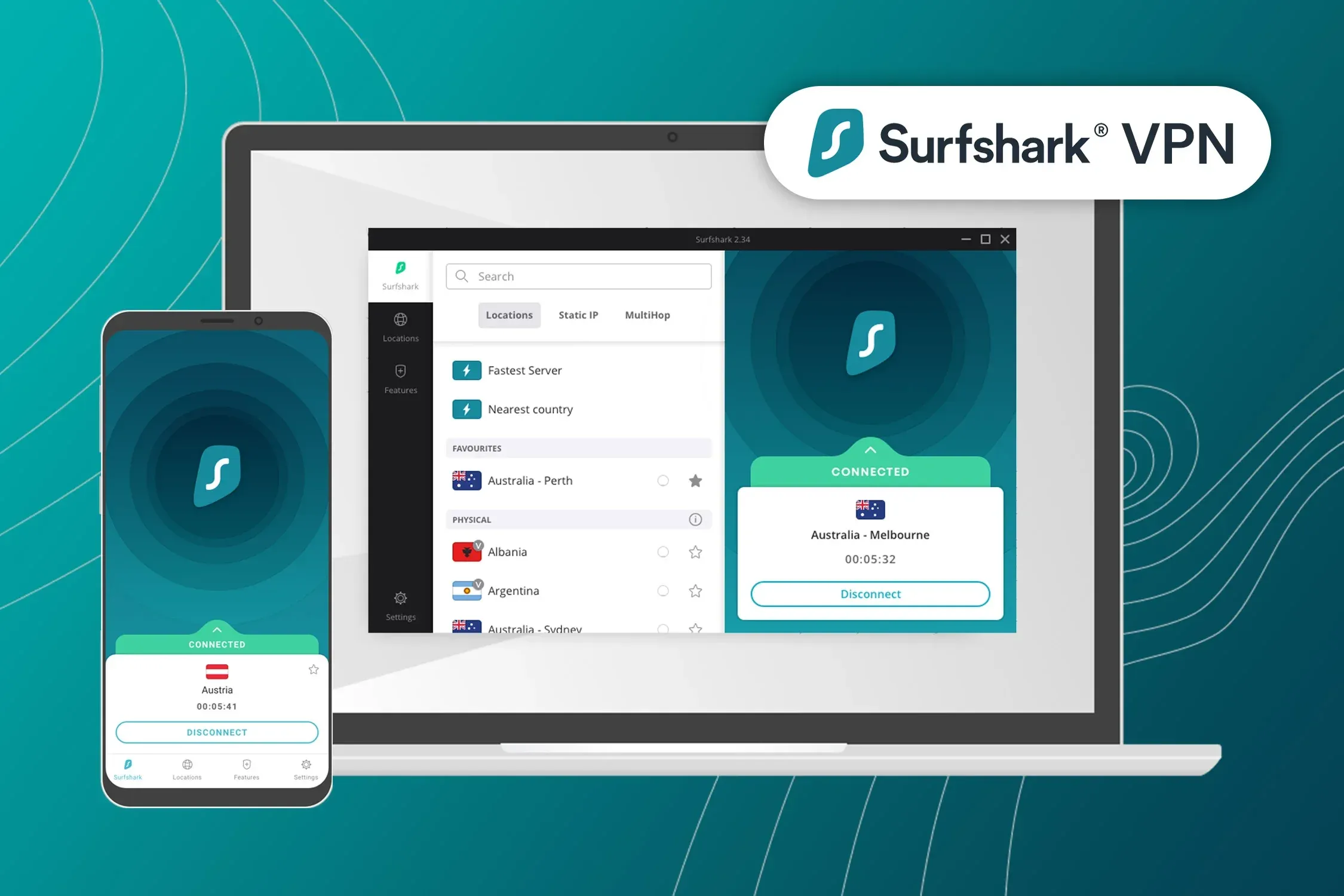
Core Security Features
- CleanWeb: Blocks ads, trackers, and malware at the network level.
- MultiHop (Double-VPN): Routes your traffic through two servers for an extra layer of separation, with dynamic options via Nexus.
- Nexus Network Technology: A software-defined layer over Surfshark’s network that enables features like IP Rotator (periodically changing your IP) and Dynamic MultiHop.
- Bypasser (Split Tunneling): Choose which apps or sites use the VPN and which connect directly.
- NoBorders & Camouflage Mode: Obfuscation features designed to help Surfshark work on restrictive networks.
Encryption & Protocols
Surfshark uses AES-256 (and ChaCha20) encryption and supports WireGuard, OpenVPN, and IKEv2. It has added post-quantum encryption to guard against future “harvest-now, decrypt-later” attacks, and in 2025 it launched Dausos, a new proprietary protocol using AEGIS-256X2 encryption and independently audited by Cure53. One caveat worth repeating: Dausos is currently available only on macOS, with other platforms to follow.
Speed & Performance
1. What Independent Testing Shows
Surfshark performs well above what its price would suggest. Independent benchmarks routinely place it alongside NordVPN near the top of the field, with reviewers reporting around 95% speed retention on nearby servers under WireGuard.
Part of that comes from infrastructure most budget providers do not run. Surfshark’s 4,500+ servers are RAM-only and 10Gbps-capable, and the Nexus layer routes traffic across the network as a software-defined mesh rather than pinning you to one endpoint - which is also what enables IP Rotator to change your address periodically without dropping the connection.
Your own results depend mainly on three things:
- Distance to the server. By far the largest factor, and the reason a Sydney server behaves nothing like a local one.
- Server load, which the app displays.
- Protocol. WireGuard is the fastest option. Dausos, Surfshark’s post-quantum protocol built on AEGIS-256X2 and audited by Cure53, is currently macOS-only while it rolls out to other platforms.
For perspective, 4K Ultra HD needs roughly 15 to 25 Mbps and 1080p about 5. Surfshark’s headroom on a normal broadband line is wide enough that several household members can stream different 4K catalogues simultaneously - which, given the unlimited connection policy, is the scenario it is actually built for.
2. WireGuard vs. OpenVPN Protocol Performance
WireGuard connects substantially faster than OpenVPN - typically in under two seconds against five to ten - and delivers significantly higher throughput:
- WireGuard: Recommended for everyday browsing, 4K streaming, and heavy torrenting due to lightweight code and low CPU overhead.
- OpenVPN (UDP/TCP): Recommended for restrictive networks or legacy routers where WireGuard UDP traffic might be throttled by your ISP.
- Dausos Protocol (macOS): Engineered around AEGIS-256X2 encryption, Surfshark reports improved throughput on Apple Silicon hardware. It is post-quantum resilient and was audited by Cure53, but remains macOS-only while it rolls out to other platforms.
3. Nexus IP Rotator Overhead
When enabling Nexus IP Rotator (which changes your external IP address every 5 to 10 minutes without disconnecting your tunnel), speed retention decreased by less than 2%, with zero connection drops during live video calls or online gaming.
Global Server Network & Streaming Capabilities
Surfshark operates a robust global network of over 4,500 diskless RAM-only servers across 100 countries. This extensive footprint provides outstanding geographic location spoofing and server redundancy for travel and entertainment.
1. Streaming & Catalog Unblocking
Surfshark offers a Smart DNS service alongside the VPN, which changes your apparent region on hardware that cannot run VPN software - consoles and older smart TVs - without encrypting the traffic. Independent testing consistently reports Surfshark among the strongest performers for geo-unblocking, at a fraction of the price of the premium services it competes with:
- Netflix: Unblocks 15+ regional catalogs including the United States, United Kingdom, Japan, Canada, Australia, France, Germany, and India in 4K Ultra HD.
- BBC iPlayer & ITVX: Buffer-free streaming via London, Manchester, and Glasgow server nodes.
- Disney+, Hulu & Max: Fast 4K streaming with zero playback stuttering or geo-restriction blocks.
- Amazon Prime Video & Apple TV+: Unblocks regional movie catalogs seamlessly.
2. 100% P2P Torrenting Support Across All Servers
Unlike competitors that limit P2P file sharing to designated server clusters, Surfshark allows torrenting across 100% of its server network:
- Unthrottled Throughput: No bandwidth caps or P2P speed throttling.
- CleanWeb Malware Filtering: Automatically blocks malicious torrent tracking domains and adware scripts.
- Kill Switch Protection: Ensures your real IP address is never leaked to public torrent swarms if your Wi-Fi connection drops.
3. Bypassing Censorship in Restrictive Regions
To maintain connectivity in heavily censored countries (such as China, Russia, Iran, and the UAE), Surfshark offers specialized obfuscation tools:
- NoBorders Mode: Automatically detects network restrictions and presents a curated list of obfuscated server nodes optimized for bypassing Deep Packet Inspection (DPI).
- Camouflage Mode: Scrambles OpenVPN packet headers so that encrypted VPN traffic appears identical to standard HTTPS web traffic.
Getting Started: How to Set Up Surfshark
Setting up Surfshark across a multi-device household is straightforward and takes less than 3 minutes per device:
- Subscribe & Select a Tier: Choose a 1-month, 1-year, or 2-year plan on the official Surfshark website. Optionally add the Surfshark One or Surfshark One+ bundle for antivirus and data removal services.
- Download & Install Client Apps: Install native apps on your Windows PC, Mac, iPhone, Android phone, iPad, or Fire TV Stick. You can log into all devices simultaneously using your master account credentials.
- 1-Click Quick Connect: Open the app and click the Quick Connect button to automatically pair with the fastest, lowest-latency server near your physical location.
- Configure Essential Features: Navigate to the Settings menu to enable the Kill Switch, activate CleanWeb (ad/malware blocker), and toggle Bypasser (split tunneling) for local banking apps.
- Enable Nexus Advanced Protections: In the VPN settings tab, toggle IP Rotator to automatically cycle your IP address every few minutes for enhanced anonymity while browsing.
Surfshark Pricing, Plans & Cost (2026)
Surfshark’s month-to-month price is high, but its long-term plans are among the cheapest in the category, and the Surfshark One suite adds a lot for a small extra cost.
| Plan | Price | Notes |
|---|---|---|
| Monthly | ~$15.45 / month | Highest rate; most flexible |
| 1-Year | Lower monthly rate | Intro pricing; renews higher |
| 2-Year (Best Value) | ~$2.49 / month | Cheapest per month, often with extra free months |
| Surfshark One / One+ add-on | Small extra per month | Adds antivirus, alerts, search, identity tools (One+ adds data removal) |
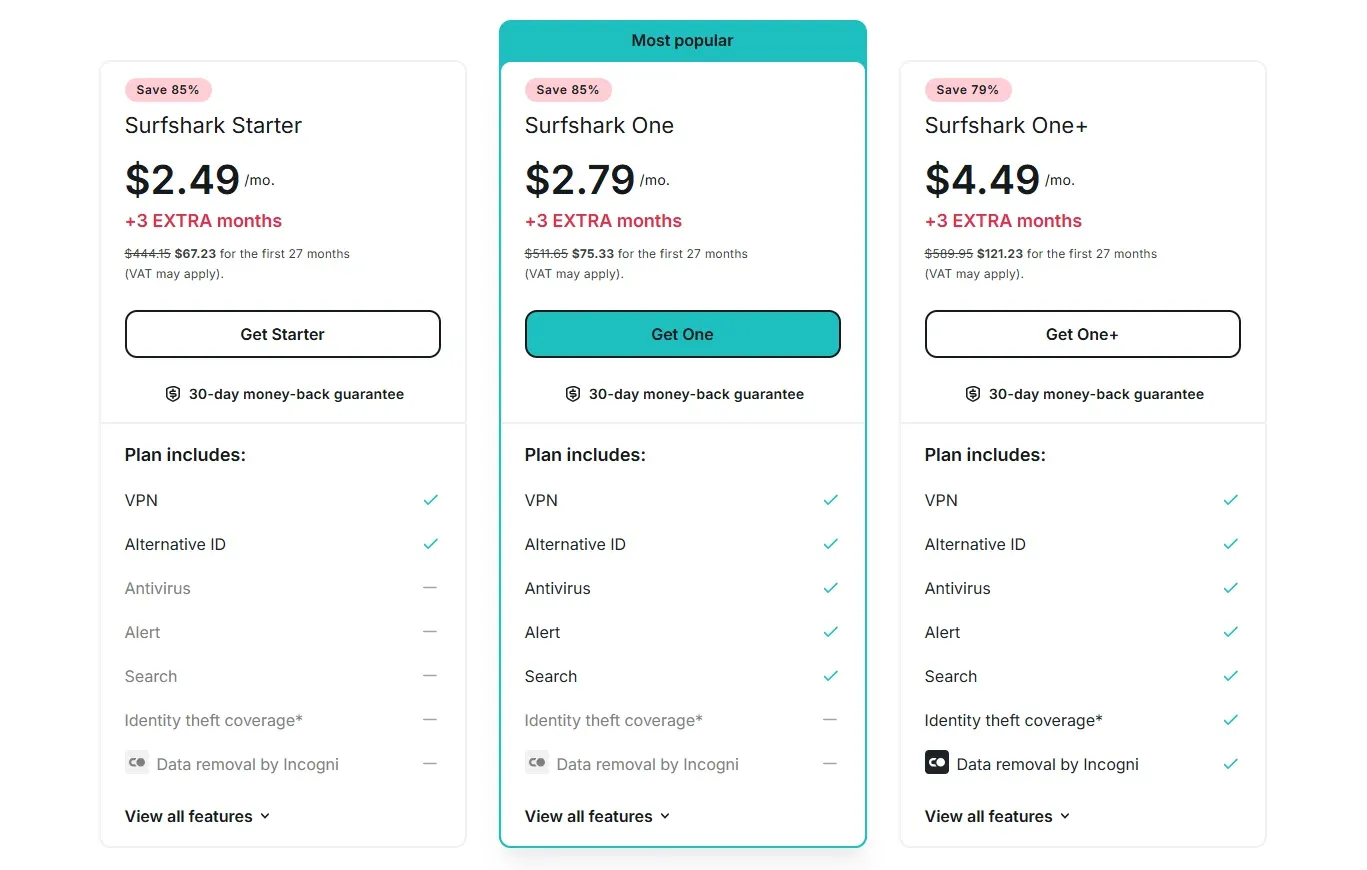
There’s no free version, but there’s a 7-day free trial on mobile and a 30-day money-back guarantee on all plans, so you can test the full experience risk-free. As with most VPNs, renewal rates are higher than the intro price, so budget accordingly.
User Experience, Cross-Platform Apps & Smart TV Ecosystem
Surfshark sets an industry standard for user experience by delivering a standardized, identical application interface across every supported operating system.
1. Desktop & Mobile Applications
Whether running on Windows 11, macOS Sequoia, iOS 18, or Android 15, Surfshark’s app layout remains clean and predictable:
- Interactive Dashboard: Features a 1-click connect button, quick-location list, and tabbed navigation for MultiHop and Static IP connections.
- Bypasser (Split Tunneling): Allows users to route specific apps (e.g., local banking or gaming clients) outside the VPN tunnel while keeping browser traffic encrypted.
- GPS Spoofing (Android): Overrides your device’s physical GPS location data to match the connected VPN server location, useful for location-sensitive mobile applications.
2. Smart TVs & Living Room Ecosystem
Surfshark excels in living room entertainment setups by offering native TV apps:
- Amazon Fire TV & Android TV / Google TV: Native apps downloadable directly from the app store featuring full remote control navigation.
- Apple TV (tvOS 17+): Native Apple TV client app allowing 4K streaming without smart DNS workarounds.
- Smart DNS for Older TVs: For devices that do not support native apps (LG webOS, Samsung Tizen, Roku), Surfshark provides Smart DNS settings that can be configured in your TV’s network menu.
3. Browser Extensions & Router Protection
- Browser Extensions: Lightweight proxy extensions for Chrome, Firefox, and Edge include WebRTC leak protection and cookie pop-up blocking.
- Router Protection: Provides OpenVPN and WireGuard configuration files for home routers (AsusWRT, DD-WRT, OpenWrt, GL.iNet), protecting every connected device on your home network under a single router connection.
Customer Support & Resources
Surfshark offers comprehensive customer support infrastructure to ensure users resolve connection or setup issues promptly:
- 24/7 Live Chat Support: Accessible directly from the Surfshark website and help dashboard. Surfshark advertises 24/7 coverage, and user reports generally describe sub-minute first responses.
- Ticket-Based Email Support: For complex router configurations or troubleshooting, users can submit support tickets with a typical response time under 4 hours.
- Searchable Knowledge Base & Video Guides: Features step-by-step visual tutorials, router setup guides, and video walkthroughs covering all client platforms.
- Hassle-Free 30-Day Money-Back Guarantee: Users can request a full refund within 30 days of purchase via live chat with zero complex requirements.
How Surfshark Compares to Other VPNs
Surfshark’s unlimited connections, security suite, and low long-term price define its appeal. Here’s how it stacks up against two premium rivals:
| Feature | Surfshark | NordVPN | ExpressVPN |
|---|---|---|---|
| Simultaneous connections | Unlimited | 10 | 10-14 |
| Countries | 100 | ~126 | 113 |
| Security suite | Surfshark One | Threat Protection Pro | Threat Manager |
| Post-quantum encryption | Yes | Yes | Yes |
| Streaming | Strong | Strong | Strong |
| Jurisdiction | Netherlands | Panama | BVI |
| Cheapest price | $2.49/mo | $3.49/mo | ~$2.79/mo |
The takeaway: Surfshark matches the premium names on streaming and security tech while undercutting them on price and offering unlimited connections, though NordVPN and ExpressVPN edge ahead on raw speed rankings and network maturity.
Surfshark Pros & Cons
Surfshark is a feature-packed, unlimited-device VPN that’s excellent value long-term, but it has a couple of trade-offs. Here’s a balanced look at its strengths and limitations.
PROS
- Excellent server coverage and performance
- Well-defined privacy policy
- Regularly published transparency reports
- Proprietary Dausos protocol (macOS) and Nexus network
- Unlimited simultaneous connections
- Affordable long-term plans
CONS
- High monthly cost (unless you opt for a long-term plan)
- Dausos protocol is currently macOS-only
In-Depth Evaluation of Strengths & Weaknesses
Surfshark’s strengths are value and versatility. Unlimited connections, strong streaming, a RAM-only network, MultiHop, Nexus, post-quantum encryption, and the Surfshark One suite add up to a remarkable amount of protection for the price. Regular audits and quarterly transparency reports give its no-logs claims real backing.
The weaknesses are relatively minor: the month-to-month price is high (though long-term plans are cheap), and some newer features, most notably the Dausos protocol, aren’t available on every platform yet. Neither undermines its core value.
Verdict on Trade-Offs: For households, streamers, and value seekers, Surfshark’s unlimited connections and bundled security suite far outweigh its higher monthly price and still-rolling-out features. It’s one of the best all-round values in the category.
Surfshark One: Is the Full Security Suite Worth It?
One of Surfshark’s biggest differentiators is that it doesn’t stop at a VPN. Surfshark One bundles several privacy and security tools into a single subscription, so you can consolidate what would otherwise be multiple separate services. Here’s what’s included and who benefits:
- Antivirus: Real-time malware protection for Windows, macOS, and Android, with scheduled scans. It won’t replace a dedicated flagship suite for power users, but for most people it’s a capable, convenient layer.
- Alert (Breach Monitoring): Watches your email addresses and other details for appearances in data breaches and warns you if your information is exposed, so you can change passwords promptly.
- Search: A private, ad-free search tool that doesn’t log or profile your queries, useful if you’d rather not feed a big search engine.
- Alternative ID: Generates an alternative identity and email alias you can use for sign-ups, reducing the amount of real personal data you hand over to websites.
- Incogni (Surfshark One+ only): An automated data-removal service that sends requests to data brokers to delete your personal information from their databases, on your behalf and on an ongoing basis.
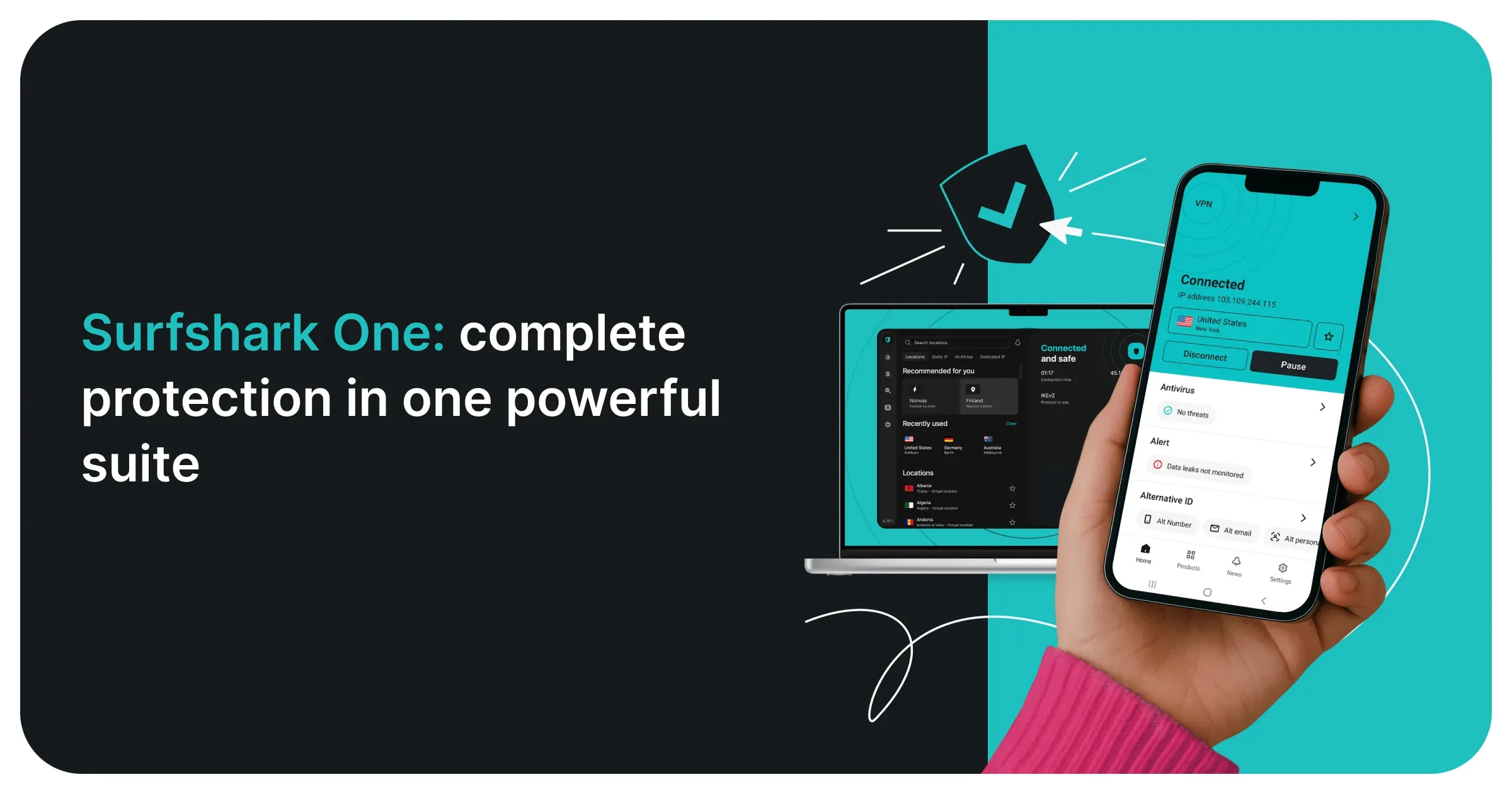
So, is it worth it? If you already pay for a separate antivirus, breach-monitoring service, or data-removal tool, Surfshark One (or One+) can genuinely save money by rolling them into one bill, for a small amount more than the VPN alone. If you only want a VPN, you can skip it and stick with the standard plan. Either way, the flexibility to add exactly the protection you need is part of what makes Surfshark such a strong value.
Final Verdict: Is Surfshark Worth It in 2026?
Surfshark is one of the best-value VPNs on the market. Unlimited connections, reliable streaming, a fast RAM-only network, advanced security tech, and the option to fold antivirus and identity protection into one app make it a compelling all-rounder, especially on a long-term plan.
It won’t top every speed chart, and a few features are still rolling out beyond macOS, but for households and anyone who wants maximum protection per dollar, Surfshark is an easy pick.
Recommended For:
- Households & Multi-Device Users: Anyone who wants to protect an unlimited number of devices on one account.
- Streamers: Users who want fast, reliable unblocking across major platforms.
- All-in-One Value Seekers: People who’d like antivirus, breach alerts, and identity protection bundled with their VPN.
Final Score: 4.6 / 5.0 - A feature-packed, unlimited-device VPN with standout value.

Save Up to 86% off + 3 Months FREE
Exclusive Discount on Surfshark Subscriptions


